
Restaurant website must-haves are the foundational features every site needs to convert visitors into paying customers. In 2026, the industry term for this set of requirements is "conversion-driven web design," and it covers everything from mobile-first layouts to HTML menus and integrated ordering buttons. This guide breaks down what is restaurant website must-haves in practical terms, so you can audit your current site or build a new one with confidence. Get these elements right and your website becomes your best-performing front-of-house staff member.
What critical information must every restaurant website display?
Consistent contact info improves user confidence and conversion. Customers who cannot find your address, phone number, or hours within seconds will leave and call a competitor. These details belong on every single page, not just the contact page.
Here is what to display consistently across your entire site:
- Address and map link on every page footer, linked to Google Maps for one-tap directions
- Phone number displayed as a clickable tel: link so mobile users can call without copying and pasting
- Current hours including holiday exceptions, updated in real time
- Ordering button above the fold on every page, not buried in a navigation menu
If you operate multiple locations, each location needs its own dedicated page with accurate, location-specific details. A single "Locations" page that lists three addresses in plain text is not enough. Google uses those individual pages for local search ranking, and customers use them to confirm they are ordering from the right branch.
Ordering access visible on every page increases direct orders and reduces drop-off. Place a sticky "Order Now" button in the header so it stays visible as users scroll through your menu. Every extra click between a hungry customer and checkout costs you a real order.

Pro Tip: Use a contrasting color for your ordering button so it stands out from the rest of your navigation. If your site uses a dark color scheme, a bright amber or white button will draw the eye immediately.
A website readiness checklist is a practical way to audit these basics before launch or during a redesign. Run through it quarterly to catch outdated hours, broken phone links, or missing location pages before a customer does.
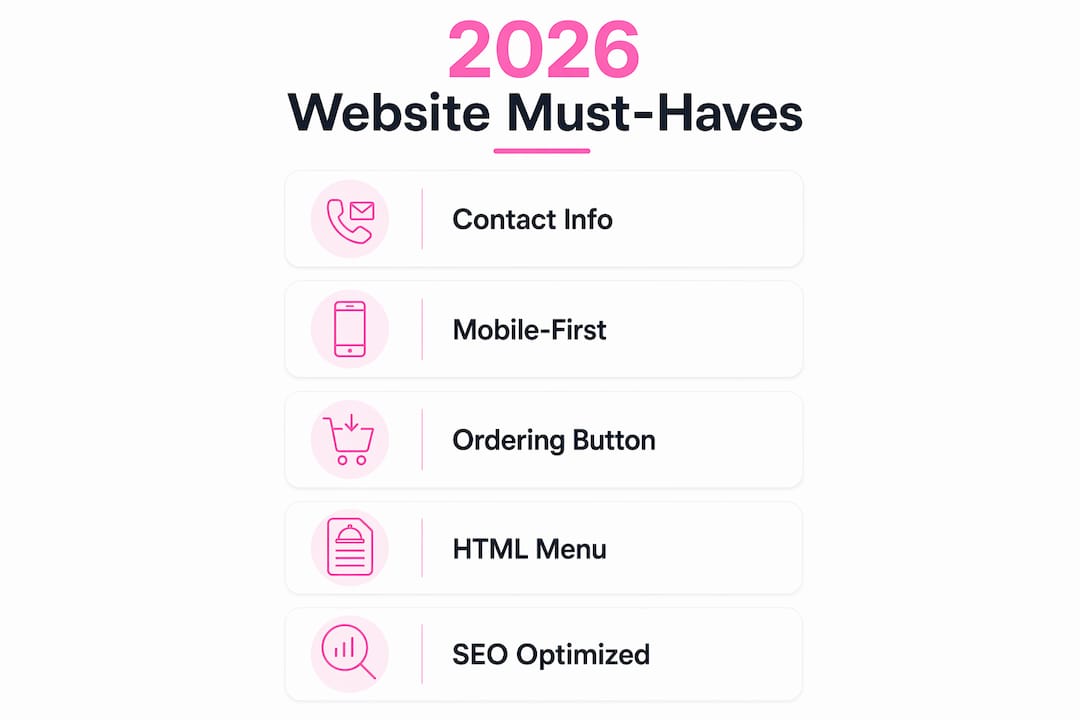
Why is mobile-first design non-negotiable in 2026?
More than 70% of restaurant website traffic comes from mobile devices. That single statistic means your mobile experience is your primary experience, not a secondary concern.
Mobile-first design means building the site for small screens first and scaling up to desktop, not the reverse. The practical standards in 2026 include tap targets no smaller than 44x44 pixels, text readable at 16px without zooming, and no horizontal scrolling. Any site requiring pinching or zooming is perceived as unprofessional by diners. That perception kills trust before a customer even reads your menu.
"High-performing restaurant websites load in under two seconds on mobile connections, with large tap targets and no zooming needed to view menus." — Chowly
Speed is part of mobile-first design, not a separate consideration. A one-second delay in load time reduces conversion rates by about 7%. For a restaurant doing $10,000 per month in online orders, that is $700 in lost revenue from a single second of lag. Understanding why load speed matters for SEO goes beyond user experience. Google uses mobile page speed as a direct ranking factor, so a slow site loses both customers and search visibility simultaneously.
Pro Tip: Test your site on a real Android device on a 4G connection, not just Chrome DevTools. Real-world mobile performance often differs significantly from simulated results.
The difference between a good and poor mobile experience is concrete. A good experience: the user taps a link from Google, the page loads in under two seconds, they tap "Order Now" with a thumb, and they complete checkout without pinching the screen once. A poor experience: the page takes five seconds to load, the menu is a PDF that opens sideways, and the ordering button is hidden in a hamburger menu three taps deep.
How should menus be presented for SEO and conversions?
Your menu is the most viewed page on your restaurant website. It is also the most critical conversion driver. How you format it determines both how Google indexes your content and how quickly customers make ordering decisions.
| Format | SEO Indexable | Mobile Friendly | Load Speed | Update Ease |
|---|---|---|---|---|
| HTML menu | Yes | Yes | Fast | Easy |
| PDF menu | No | Poor | Slow | Requires re-upload |
| Image-based menu | No | Varies | Slow | Requires redesign |
| Third-party embed | Partial | Yes | Varies | Managed externally |
HTML menus outperform PDFs for both SEO and user experience. When your menu is in HTML, Google can index individual dish names, descriptions, and prices. That means a user searching "wood-fired margherita pizza near me" can land directly on your menu page. A PDF is invisible to search engines and forces mobile users to pinch and zoom through a document designed for print.
Structure your HTML menu with clear category headings like Starters, Mains, and Desserts. List prices next to every item. Include brief descriptions that mention key ingredients, especially allergens. Customers make faster decisions when they can scan a well-organized menu without scrolling through a wall of text.
Keep your menu updated. A menu showing prices from two years ago or dishes you no longer serve destroys trust instantly. Set a calendar reminder to review menu accuracy every time you change your offerings. If you use a content management system like WordPress or Squarespace, updating an HTML menu takes under five minutes.
One more detail that matters: do not make the menu a separate download. Keep it on-page, load it fast, and link to it from your homepage navigation. Customers who have to hunt for your menu will not wait.
What advanced features set high-performing restaurant sites apart?
Beyond the basics, several features separate a functional restaurant website from one that actively builds your business. These are the key elements for effective restaurant sites that drive repeat visits and brand loyalty.
- Online reservation widgets: Tools like OpenTable integrated directly on your site let customers book a table without calling. Reservation widgets improve customer convenience and increase bookings. A restaurant reservation SaaS blueprint can help you evaluate which technology fits your operation before committing to a platform.
- High-quality food photography: Professional photography drives conversion and shapes brand perception. A single well-lit photo of your signature dish does more for online orders than three paragraphs of description. Hire a food photographer for a half-day shoot and use those images across your site and social channels.
- Customer reviews and press badges: Social proof elements like visible reviews increase credibility and repeat visits. Embed a Google Reviews widget or display your Yelp rating prominently. If a local publication has reviewed your restaurant, display that badge on your homepage.
- Email capture and promotions: A simple signup form offering 10% off a first online order builds your direct marketing list. Email remains the highest-ROI digital marketing channel for local businesses.
- Social media links: Link to your active Instagram or Facebook profiles so customers can see real-time content. User-generated content from tagged posts builds trust faster than any copy you write yourself.
Each of these features adds a layer of trust and convenience that keeps customers coming back. The best practices for restaurant websites treat the site as a living tool, not a static brochure.
Key takeaways
A restaurant website converts visitors into customers only when it combines fast mobile performance, visible ordering access, indexable HTML menus, and trust-building social proof on every page.
| Point | Details |
|---|---|
| Display contact info everywhere | Address, phone, and hours must appear on every page, not just the contact page. |
| Prioritize mobile speed | Sites loading in under two seconds on mobile directly protect conversion rates. |
| Use HTML menus, not PDFs | HTML menus are indexed by Google and load faster on mobile devices. |
| Keep ordering buttons visible | A sticky "Order Now" button above the fold reduces drop-off at every stage. |
| Add social proof and photography | Reviews, press badges, and professional food photos build trust and drive repeat visits. |
What i've learned building restaurant sites that actually convert
After working on dozens of restaurant websites, the pattern is clear: owners spend the most time on visual design and the least time on the features that actually drive revenue. A beautiful homepage with a slow load time and a PDF menu will underperform a plain site with a fast HTML menu and a visible ordering button every single time.
The biggest mistake I see is treating the mobile experience as an afterthought. Restaurants will invest in a stunning desktop design and then wonder why online orders are low. The answer is almost always that 70% of their visitors are on phones and the experience is broken. Fix mobile first. Everything else is secondary.
Menu updates are another area where restaurants consistently lose money. An outdated menu with wrong prices or discontinued dishes creates friction and erodes trust. I recommend treating your menu page like a product listing, not a static document. Update it the same day you change anything in your kitchen.
The feature that surprises most restaurant owners is the impact of user-generated content. When you embed a live Instagram feed or display tagged customer photos, you give new visitors social proof that feels authentic. No amount of professional copy matches a real customer photo of a full table enjoying your food on a Saturday night.
Finally, do not underestimate website speed audits. Run one every quarter. A site that loaded in 1.8 seconds at launch can creep to 4 seconds within a year as plugins, images, and third-party scripts accumulate. That creep costs you rankings and orders without any visible warning sign.
— Ville
Build your restaurant website the right way
Getting all these features right from the start saves you months of patching and lost revenue. Verkkosivu builds custom restaurant websites that load in under one second, include mobile-first design from day one, and incorporate SEO-ready HTML menus and integrated ordering without using templates.
Every Verkkosivu project includes an initial consultation, full deployment, and ongoing maintenance so your site stays fast and accurate as your menu and hours change. With more than 100 successful projects and a perfect 5-star rating on Google, Verkkosivu delivers results in as little as 48 hours. If you are ready to build a site that works as hard as your kitchen does, explore Verkkosivu's services and get started today.
FAQ
What should a restaurant website include at minimum?
Every restaurant website needs a visible address, phone number, hours, an HTML menu, and an ordering or reservation button. These five elements cover the core needs of every visitor arriving from a search engine.
Why is a PDF menu bad for restaurant websites?
PDF menus are not indexed by Google, load slowly on mobile, and require zooming to read. An HTML menu is searchable, fast-loading, and readable on any screen size without extra effort from the user.
How fast should a restaurant website load?
High-performing restaurant sites load in under two seconds on mobile connections. A one-second delay reduces conversions by approximately 7%, making speed a direct factor in online order revenue.
Do restaurant websites need online reservation tools?
Yes. Integrated reservation widgets like OpenTable remove the friction of phone bookings and increase table reservations. Customers expect to book online the same way they order food online.
How often should a restaurant website be updated?
Update your menu and hours every time they change, and run a full site audit at least once per quarter. Outdated information is one of the fastest ways to lose customer trust and search ranking.