
A minimum viable website is the leanest, fully functional site a business can publish to establish a credible online presence and start attracting customers without waiting for a perfect build. The concept borrows directly from the minimum viable product (MVP) framework popularized by Eric Ries in The Lean Startup, where you ship the smallest version that delivers real value. Platforms like WordPress, Squarespace, and HubSpot make this achievable in days, not months. The goal is not a placeholder page. It is a real, working site that answers visitor questions, builds trust, and opens the door to early customer feedback.
What is a minimum viable website and why does it matter?
A minimum viable website is defined as the smallest set of pages and content a business needs to go live professionally and start generating leads or credibility. It is not a "coming soon" page and it is not a half-finished project. It is a deliberate, focused site built around three core goals: communicate what you do, establish why visitors should trust you, and make it easy for them to reach you.
The MVP website concept matters because most small business owners stall at the planning stage. They wait for the perfect logo, the perfect copy, the perfect color scheme. Meanwhile, competitors with simpler sites are already collecting customer feedback and refining their offer based on real data. Launching a minimal but functional site lets you enter the market, get discovered, and iterate from a position of knowledge rather than assumption.

For entrepreneurs, speed to publish is a competitive advantage. A site that goes live this week beats a polished site that launches in six months. The minimum viable website approach treats your online presence as a living product, not a finished artifact.
What pages and content are essential for a minimum viable website?
Three evergreen pages form the non-negotiable foundation of any minimum viable website: the Home page, the About page, and the Contact page. Each one answers a specific question visitors arrive with, and together they cover the full arc of a first impression.
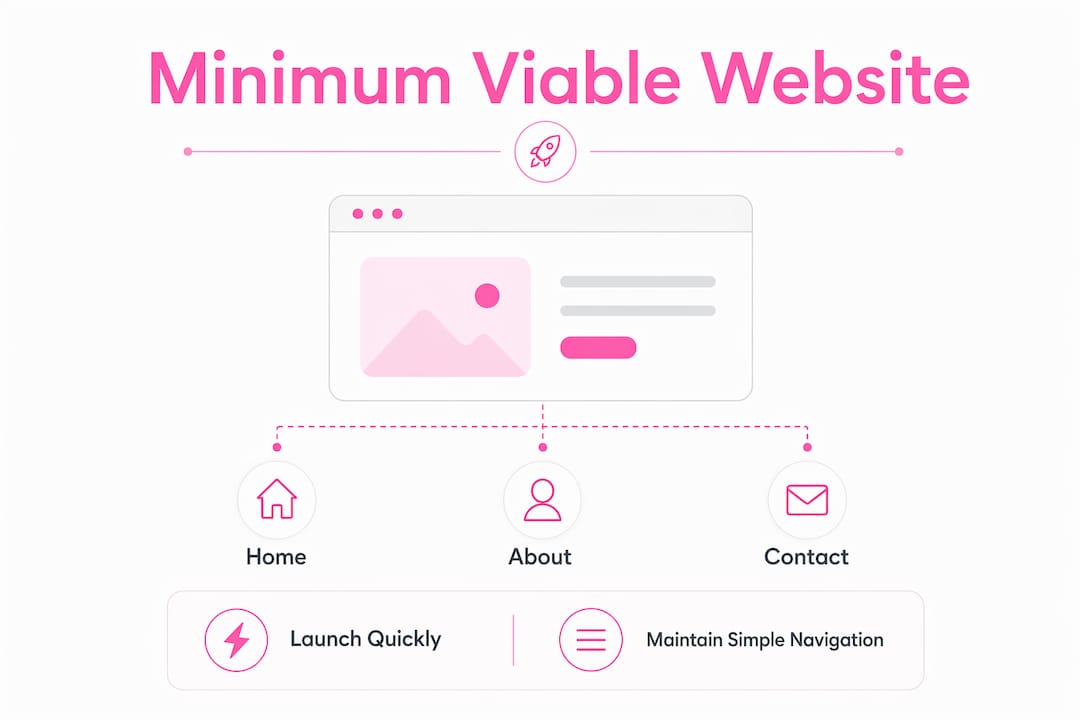
The home page: your business pitch in seconds
The Home page is where you make or lose a visitor in under ten seconds. A strong value proposition headline should immediately communicate the core problem you solve and the result you deliver. Below that, a short paragraph or three bullet points can reinforce the offer. Add one clear call to action, such as "Book a Free Call" or "Get a Quote," and your Home page is doing its job.
Avoid the temptation to cram in everything your business does. Visitors scan before they read. One clear message beats five competing ones every time.
The about page: credibility on a page
About pages are among the most visited pages on any business website, which surprises many first-time site owners. Visitors go there to verify that a real, qualified person or team is behind the business. Your About page should name who you are, state your relevant experience, and explain why you started the business. A professional photo adds significant trust.
For startups, this page also speaks to potential investors and early adopters who want to know the team's qualifications and mission before committing.
The contact page: removing friction from the conversation
Contact pages must provide clear, user-friendly ways for visitors to reach you. A simple contact form routed to your business email is the minimum. Adding a phone number, a business address (even a city), and a response time expectation ("We reply within one business day") removes hesitation and builds confidence. Visitors who cannot find a way to contact you will leave and not return.
Pro Tip: Before publishing your Contact page, submit the form yourself and confirm the message lands in your inbox. Broken contact forms are one of the most common and most damaging mistakes on new websites.
Here is a quick checklist of what each essential page needs at minimum:
- Home: Clear headline, one-paragraph description, single call to action
- About: Who you are, relevant credentials, a photo, and your mission
- Contact: A working form, email address, and expected response time
How does a minimum viable website differ from a full site or a prototype?
Understanding the distinctions between these three website types helps you set realistic expectations and avoid scope creep before you even launch.
| Type | Purpose | Audience | Scope |
|---|---|---|---|
| Prototype | Test design or tech concepts internally | Internal team, investors | Not public-facing, often non-functional |
| Minimum viable website | Launch publicly with core pages to collect real feedback | Real customers and leads | 3 to 5 pages, fully functional |
| Full website | Serve a mature business with complete content needs | Broad public audience | 10 or more pages, rich features |
MVP websites differ from prototypes in one critical way: they are live, public, and built to generate real-world responses. A prototype tests assumptions in a controlled setting. A minimum viable website tests them in the market. Full websites, by contrast, include blog archives, resource libraries, detailed service pages, e-commerce functionality, and more. Around 4 to 10 pages often represent the ideal size for efficient small business websites, balancing content depth with usability.
The minimum viable website sits at the lean end of that range. It is functional but intentionally scoped. In agile and lean startup contexts, this approach reduces upfront investment and aligns development with what customers actually need rather than what founders assume they need.
How to build and launch your minimum viable website in one week
You can create and launch a minimum viable website in about one week by following a focused daily schedule. The key is to work in phases and resist the urge to expand scope mid-build.
-
Day 1: Choose your platform and register your domain. WordPress, Squarespace, Webflow, and HubSpot all offer beginner-friendly setups. Pick one based on your technical comfort level and budget. Register a domain that matches your business name as closely as possible.
-
Day 2: Write your Home page copy. Draft your headline, your one-paragraph description, and your call to action. Write for clarity, not cleverness. Read it aloud. If it sounds like something you would say to a customer in person, it is working.
-
Day 3: Write your About page. List your credentials, your mission, and a short personal story. Keep it under 300 words. Add a professional photo.
-
Day 4: Set up your Contact page. Install a contact form plugin or use your platform's built-in form tool. Test it. Add your email address and response time.
-
Day 5: Design and format. Choose a clean, minimal theme or template. Apply your brand colors and logo. Prioritize readability over visual complexity.
-
Day 6: Review and test. Read every page on both desktop and mobile. Click every link and button. Ask one trusted advisor or mentor to review the site and give honest feedback.
-
Day 7: Publish. Prioritize publishing over perfection. A live site with minor imperfections beats a perfect site that never goes live.
Pro Tip: When choosing a platform, consider whether you want to manage the site yourself long-term. If you plan to hire a developer later, Webflow or WordPress offer more flexibility than fully hosted builders like Squarespace.
If you are weighing whether to build the site yourself or hire a professional, reviewing the pros and cons of each approach before committing can save you significant time and money.
What else should your minimum viable website include to stay effective?
Beyond the three core pages, a handful of technical and structural decisions determine whether your site actually performs once it is live. These are not optional extras. They are the foundations that make your minimum viable website findable, trustworthy, and scalable.
-
Domain and SSL: A memorable domain name paired with SSL (the padlock in the browser bar) is the baseline for any credible business site. A basic website setup includes a memorable domain, reliable hosting with SSL, and fundamental SEO settings to maximize visibility and security. Visitors who see "Not Secure" in their browser will leave immediately.
-
Mobile responsiveness: Mobile responsiveness and site speed are critical user experience factors that directly impact visitor retention and search rankings. Over half of all web traffic now comes from smartphones. A site that breaks on mobile is not a minimum viable website. It is a broken website.
-
Page load speed: Slow sites lose visitors fast. Aim for a load time under two seconds. Compress images before uploading, avoid heavy plugins, and choose a hosting provider with solid performance. Verkkosivu builds every site to load in under one second, which puts clients ahead of the majority of competitors on both user experience and SEO.
-
Basic SEO settings: Set a page title and meta description for each page. These appear in Google search results and directly affect click-through rates. Connect your site to Google Search Console so you can monitor how it is being indexed.
-
Optional but valuable additions: A Privacy Policy page is legally required in most jurisdictions if you collect any visitor data, including through contact forms. A short FAQ page and a Testimonials section can also be added quickly and meaningfully improve conversion rates. For guidance on what technical SEO basics to prioritize from day one, a structured checklist helps avoid common oversights.
Keep your navigation simple. Three to five links in your main menu is enough. Visitors should never need more than two clicks to find what they are looking for.
Key takeaways
A minimum viable website requires three core pages, a clean technical foundation, and a bias toward publishing quickly over perfecting indefinitely.
| Point | Details |
|---|---|
| Three pages are non-negotiable | Home, About, and Contact form the foundation every minimum viable website must have before launch. |
| Launch speed beats perfection | Publishing a functional site this week generates real feedback that no amount of planning can replicate. |
| Prototypes are not MVPs | A minimum viable website is public-facing and functional; a prototype is internal and often non-interactive. |
| Technical basics matter from day one | SSL, mobile responsiveness, and basic SEO settings are required, not optional, for a credible launch. |
| The site evolves post-launch | Treat your minimum viable website as version one, not the final product, and expand based on real user data. |
Why I always tell clients to launch before they feel ready
Every small business owner I have worked with has felt the same pull: the urge to wait until the site is perfect before showing it to the world. I understand it. Your website feels like a direct reflection of your professionalism, and putting something imperfect out there feels risky. But in practice, the risk runs the other way.
The businesses that wait six months for a polished site often discover, after launch, that their messaging was off, their offer was unclear, or their customers wanted something they had not anticipated. The businesses that launch a clean, minimal site in week one get that feedback in week two. They fix it. They grow faster.
Launching a minimum viable website invites real user feedback that lets entrepreneurs refine their online presence without large upfront investments. That is not a consolation prize for people who could not afford a full build. It is the smarter strategy, full stop.
What I have seen work best is treating the minimum viable website as a commitment device. Once it is live, you are accountable. Customers can find you. That pressure is productive. It forces clarity, prioritization, and momentum that no amount of pre-launch planning can manufacture. Launch first. Improve from there.
— Ville
Ready to launch your minimum viable website with Verkkosivu?
Building a minimum viable website is the right first move. Building it well from the start means you will not have to rebuild it six months later.
Verkkosivu specializes in custom websites built without templates, delivered in as little as 48 hours, and optimized to load in under one second. Every project includes SEO setup, mobile optimization, and hands-on support from first consultation through final deployment. With more than 100 successful projects and a perfect 5-star rating on Google, Verkkosivu gives small businesses a professional online presence that actually wins customers. If you are ready to go live fast without cutting corners, explore what Verkkosivu can build for you and take the first step today.
FAQ
What is a minimum viable website?
A minimum viable website is the smallest set of fully functional pages a business needs to launch online professionally and start attracting customers. It typically includes a Home page, an About page, and a Contact page.
How long does it take to build a minimum viable website?
Most entrepreneurs can build and publish a minimum viable website in approximately one week by following a focused daily schedule covering copy, design, and testing.
What does a minimum viable site include at minimum?
A minimum viable site includes three core pages: a Home page with a clear value proposition, an About page that establishes credibility, and a Contact page with a working form and response time.
How is a minimum viable website different from a prototype?
A prototype tests design or technical concepts internally and is not public-facing. A minimum viable website is live, functional, and built to collect real feedback from actual customers and leads.
Do I need SEO on a minimum viable website?
Yes. Basic SEO settings including page titles, meta descriptions, SSL, and Google Search Console setup should be in place from day one to make your site findable and trustworthy from the moment it goes live.