
Regular website maintenance is the practice of keeping your site's software, content, and security systems current to protect performance and search visibility. Websites that skip this process lose ground fast. Outdated software and plugins are the leading cause of website hacking vulnerability, and neglected sites also suffer declining search rankings, broken functionality, and visitor distrust. For business owners and marketing managers, understanding why websites need regular updates is not optional. It directly affects revenue, reputation, and growth.
What security risks does neglecting website updates create?
An unpatched website is an open door for attackers. Hackers actively scan for sites running outdated WordPress plugins, themes, or CMS software because known vulnerabilities are publicly documented. Once they find a match, exploitation is fast and often automated.
The financial damage is real. The average recovery cost for a small business after a security breach from unpatched software ranges between $5,000 and $25,000. That figure covers downtime, cleanup, and reputational damage. For most small and mid-sized businesses, that is a serious hit that a consistent update schedule would have prevented.
Beyond direct costs, a breach creates lasting trust damage. Customers who see a hacked or defaced site rarely return. Search engines like Google also flag compromised sites, which can remove you from search results entirely.
Key security risks from neglecting updates include:
- Unpatched plugins and themes that contain known exploits
- Outdated CMS versions (such as WordPress core) with documented security holes
- Expired SSL certificates that strip HTTPS protection and trigger browser warnings
- No backup system, meaning a breach causes permanent data loss
Pro Tip: Set up automated offsite backups and 24/7 uptime monitoring. These two measures alone reduce the cost and duration of any recovery event significantly.
Pair your update routine with a structured website security checklist to cover every layer, from server configuration to login protection.
How do regular updates support SEO and maintain search rankings?
Google favors websites that are regularly updated with fresh content, good mobile usability, and secure HTTPS. This is not a minor ranking signal. It is a core part of how Google evaluates whether a site deserves to rank for competitive keywords.
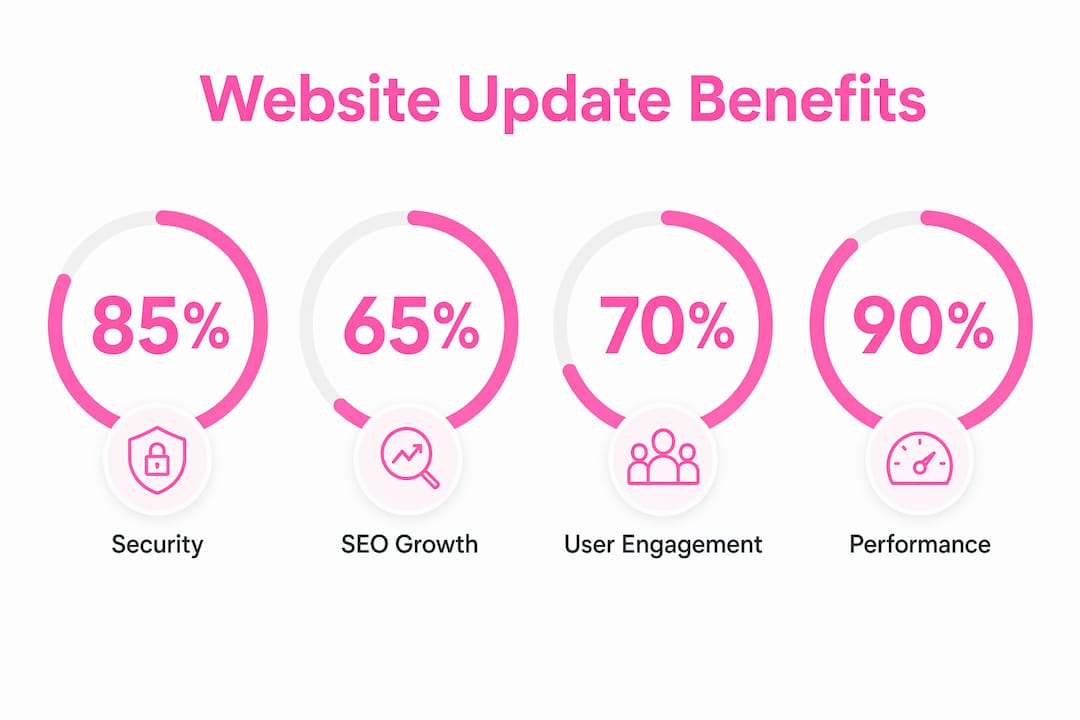
Content decay is one of the most underestimated SEO risks. Pages lose relevance and rankings over time if the content is not refreshed. A blog post that ranked well in 2023 may now sit on page three because competitors published newer, more detailed versions of the same topic. Refreshing that page with updated data, expanded sections, and current examples can recover lost rankings faster than writing a new post from scratch.
The data on this is clear. 64.7% of websites experiencing 31–40% growth focus on updating existing content rather than creating new posts. That means high-growth sites treat their existing content as an asset to maintain, not a one-time publication.
| SEO factor | Impact of regular updates |
|---|---|
| Content freshness | Prevents ranking decay on high-performing pages |
| Page speed | Faster load times improve Core Web Vitals scores |
| Mobile usability | Updated themes and layouts pass Google's mobile-first index |
| HTTPS / SSL | Active certificates prevent security warnings that hurt rankings |
| Broken links | Fixed links preserve crawl budget and user trust |
Pro Tip: Run a performance audit every quarter. Identify your top 10 traffic pages and check whether their content, internal links, and metadata still reflect current search intent.
Technical SEO health also depends on updates. Slow load times, missing schema markup, and broken redirects accumulate over time. A site that loaded in under one second at launch can degrade to three or four seconds within a year if no maintenance occurs. That degradation directly affects both rankings and conversions.
In what ways does updating websites improve user experience and engagement?
A one-second delay in page load can reduce conversions by 7%. That is not a theoretical risk. It is a measurable revenue loss that compounds every day your site runs slow. Performance maintenance keeps load times tight and keeps visitors moving toward a purchase or inquiry.

Beyond speed, outdated content actively drives visitors away. A service page listing prices from two years ago, a contact form that no longer submits, or a team page showing employees who left the company all signal neglect. Visitors interpret these signals as a sign that the business itself is unreliable.
Updating your website for user experience involves these four priorities:
- Fix broken links and forms. Broken links frustrate users and waste crawl budget. Forms that fail silently cost you leads without any visible error.
- Refresh outdated information. Update pricing, team bios, service descriptions, and case studies to reflect your current business.
- Improve mobile responsiveness. Test your site on current iOS and Android devices. Layouts that worked in 2022 may break on newer screen sizes.
- Update visuals and branding. Outdated photography, old logos, or inconsistent color schemes reduce perceived professionalism.
Pro Tip: Use Google Search Console to identify pages with high impressions but low click-through rates. These pages often have outdated titles or meta descriptions that no longer match what users are searching for.
Neglected websites suffer slow loading pages, broken links, outdated information, loss of search visibility, and visitor distrust. Each of these problems compounds the others. A slow site with broken links and stale content loses visitors, rankings, and credibility simultaneously.
How often should businesses update their websites?
Website maintenance frequency depends on the type of task. Some tasks need daily attention. Others fit a monthly or quarterly schedule. The key is building a repeatable system rather than reacting to problems after they occur.
A practical maintenance schedule looks like this:
Daily and weekly tasks:
- Run automated security scans and malware checks
- Verify uptime monitoring alerts are active and responding
- Apply available software, plugin, and theme updates
- Confirm backup completion and offsite storage
Monthly tasks:
- Review and refresh key content pages for accuracy
- Run a broken link scan and fix any dead URLs
- Check page speed scores using Google PageSpeed Insights
- Review Google Analytics for traffic drops or bounce rate spikes
Quarterly tasks:
- Conduct a full technical SEO audit
- Audit all forms, checkout flows, and lead capture tools
- Review your top 10 content pages for content decay
- Update photography, pricing, and service descriptions
| Approach | Best for | Key trade-off |
|---|---|---|
| DIY maintenance | Businesses with in-house technical staff | Requires consistent time and expertise |
| Professional maintenance | Businesses without dedicated web staff | Cost offset by reduced risk and faster fixes |
| Hybrid model | Growing businesses with mixed resources | Splits routine tasks from complex technical work |
Typical maintenance tasks include software and plugin updates, backups, fixing broken links, content updates, and uptime monitoring. Security scans and backups happen daily or weekly. Content and performance reviews fit a monthly cycle. For small business owners without a dedicated web team, a professional maintenance plan removes the risk of tasks being skipped during busy periods. Verkkosivu's approach to ongoing maintenance covers all of these layers, built around each client's specific site rather than a generic checklist.
For a detailed look at what to assess and when, the website value indicators checklist gives small business owners a structured starting point.
Key Takeaways
Regular website updates protect security, preserve search rankings, and maintain the user experience that converts visitors into customers.
| Point | Details |
|---|---|
| Security is the top priority | Unpatched software is the leading cause of hacking; recovery costs range from $5,000 to $25,000. |
| Content updates drive SEO growth | 64.7% of high-growth sites focus on refreshing existing content, not just publishing new posts. |
| Speed directly affects revenue | A one-second load delay reduces conversions by 7%, making performance maintenance a financial decision. |
| Maintenance needs a schedule | Daily security scans, monthly content reviews, and quarterly audits each serve a distinct purpose. |
| Neglect compounds quickly | Slow pages, broken links, and stale content reinforce each other, accelerating traffic and trust loss. |
Why I stopped treating website updates as optional
I have worked with enough business websites to know that the ones that fall behind on maintenance share a common pattern. The owner is busy, the site "still works," and updates get pushed to next month. Then next month becomes next quarter. By the time something breaks visibly, the damage runs deeper than a single fix.
The security threat alone changed my view on this permanently. Automated bots scan millions of sites daily looking for known plugin vulnerabilities. Your site does not need to be a high-profile target. It just needs to be running an unpatched version of a popular plugin. That is enough. The $5,000 to $25,000 recovery cost is not a worst-case scenario. It is the typical outcome.
What I find most underappreciated is the SEO angle. Business owners think of content updates as a creative task they will get to eventually. The data says otherwise. Refreshing a page that already ranks is often the fastest path to more traffic. You are working with existing authority, not building from zero. Skipping that refresh means watching a competitor take your position while you focus on publishing something new.
My advice is to treat website maintenance the way you treat accounting. You would not skip monthly bookkeeping because the business "seems fine." Your website deserves the same discipline. Build the schedule, assign ownership, and stick to it.
— Ville
How Verkkosivu handles website maintenance so you do not have to
Running a business leaves little time for plugin updates, security scans, and content audits. Verkkosivu handles all of it, from routine software patches and daily backups to quarterly performance reviews and content refreshes. Every maintenance plan is built around your specific site, not a template checklist.

Verkkosivu has completed more than 100 projects with a perfect 5-star rating on Google, and every client receives direct, responsive support throughout the relationship. If your site is falling behind on updates or you want a professional team managing its health, see how Verkkosivu works and get started without hidden costs or long delays.
FAQ
What are the main reasons websites need regular updates?
Websites need regular updates to stay secure against hackers, maintain search engine rankings, and keep visitors engaged with accurate, fast-loading content. Neglected websites lose traffic, trust, and search visibility over time.
How often should a business update its website?
Security scans and backups should run daily or weekly. Content reviews and broken link checks fit a monthly schedule. Full technical audits work best quarterly.
Does updating existing content really improve SEO?
Yes. 64.7% of high-growth websites prioritize updating existing content over creating new posts. Refreshing pages that already have authority is often faster than building rankings from scratch.
What happens if you ignore website updates?
Ignoring updates leads to security breaches, slow load times, broken links, and declining search rankings. Recovery from a breach costs small businesses between $5,000 and $25,000 on average.
Is professional website maintenance worth the cost?
For businesses without dedicated technical staff, professional maintenance reduces risk, saves time, and prevents the compounding damage that comes from skipped updates. The cost of maintenance is consistently lower than the cost of recovery.