
A slow restaurant website is a direct conversion killer. Speed is the single most measurable factor separating restaurants that capture online orders and reservations from those that lose visitors before a page even loads. The industry term for the core metric is Largest Contentful Paint (LCP), and understanding it is the fastest way to diagnose why your site may be underperforming. Google's Core Web Vitals are confirmed ranking factors, meaning a slow site costs you both customers and search visibility at the same time.
Why restaurant websites need speed: the core case
Restaurant websites face a unique performance challenge. They carry large hero images, photo-heavy menus, embedded maps, and reservation widgets, all of which compete to load simultaneously. The result is predictable: average LCP for restaurant sites sits at 13.8 seconds, nearly six times above the recommended 2.5-second threshold. That gap is not a minor technical detail. It is the difference between a guest completing a reservation and closing the tab.
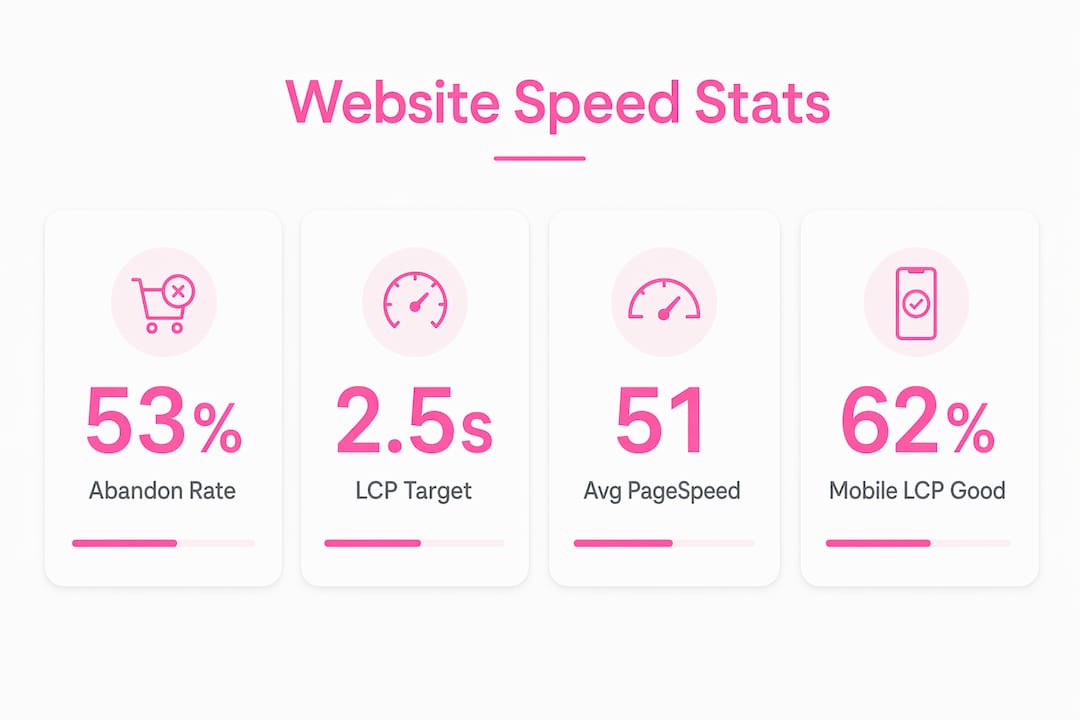
Google PageSpeed scores average 51 out of 100 for restaurant websites. That places almost half of all restaurant sites in a critical performance tier where even modest improvements produce large gains in traffic and conversions. Speed directly affects where your site ranks in local search results, and Core Web Vitals are confirmed SEO ranking factors. A faster site ranks higher, attracts more clicks, and converts more of those clicks into paying guests.

What is LCP and why does it matter for restaurants?
Largest Contentful Paint measures how long it takes for the biggest visible element above the fold to fully render. On a restaurant website, that element is almost always the hero image or the top section of the menu. LCP is the metric Google uses to judge whether a page feels fast to a real user.
The thresholds are clear:
- Good: LCP under 2.5 seconds
- Needs improvement: 2.5–4 seconds
- Poor: over 4 seconds
Only 62% of mobile sites achieve a good LCP score, while 13% fall into the poor category. That 13% represents a large share of restaurants actively driving guests away on first contact. A visitor who sees a blank screen for four seconds does not wait. They go to the next result.
Slow LCP on restaurant sites often traces back to two specific causes. First, uncompressed hero images that are several megabytes in size delay the render of the most important visual on the page. Second, render-blocking scripts and late-loading fonts push the display of key content further down the timeline. Both are fixable, but you need to know which DOM element is triggering your LCP before you can target the right fix.
Pro Tip: Use Google Search Console's Core Web Vitals report alongside PageSpeed Insights to see your real-user LCP data, not just lab scores. Lab scores can look better than what actual visitors experience on slower mobile connections.
How does slow loading affect restaurant bookings and orders?
Slow load times change guest behavior in measurable ways. 53% of mobile visitors abandon a site that takes longer than three seconds to load. For a restaurant receiving 500 mobile visits per day, that means more than 265 potential guests leave before seeing a single menu item.
The conversion damage compounds with every additional second. Each extra second of load time up to five seconds drops conversion rates by an average of 4.42%. A site loading in six seconds instead of two does not just feel slower. It statistically produces far fewer completed reservations and online orders.
Speed also shapes perceived professionalism. Consider what happens at each stage of a guest's journey on a slow site:
- Menu browsing: Images load out of sequence, making the menu look broken or unfinished.
- Reservation flow: Slow interactive elements create doubt about whether a booking actually submitted.
- Mobile navigation: Laggy page transitions signal a low-quality operation, regardless of the food quality.
"For restaurant booking or ordering conversion, the first meaningful content and interactive elements must appear fast. This gating step dictates whether customers proceed or bounce." — Core Web Vitals and Performance 2025, The Web Almanac
Speed is not just a technical metric. It is a direct signal of trust. Guests who experience a fast, responsive site are more likely to return and more likely to complete a purchase on the first visit.
Mobile vs. desktop: which matters more for restaurant sites?
Mobile performance is the competitive battleground for restaurant websites. Most guests discover restaurants on their phones, often while commuting, walking, or deciding where to eat in real time. That context means they are on slower connections with less capable hardware than a desktop user at home.
| Device | Good LCP Rate | Poor LCP Rate |
|---|---|---|
| Desktop | 74% | Lower |
| Mobile | 62% | 13% |
Mobile LCP good rates lag behind desktop by 12 percentage points. That gap exists because mobile networks introduce latency, and mobile processors render pages more slowly than desktop CPUs. A site that loads in 1.8 seconds on a laptop may take 4.5 seconds on a mid-range Android device on a 4G connection.
Restaurants that optimize for desktop first and treat mobile as secondary are making a costly mistake. The guest who is two blocks away and hungry is on a phone. If your site does not load in under three seconds on that device, they are ordering from someone else.
Pro Tip: Test your site using Google PageSpeed Insights with the mobile tab selected. The score and recommendations there reflect the experience of your most time-sensitive guests, not your most patient ones.
How to optimize restaurant website speed: priority order
Speed optimization effectiveness compounds. Fixing images alone produces gains. Fixing images plus caching produces gains that multiply beyond the sum of each individual fix. The priority order below reflects the highest-impact actions first.
-
Compress and resize hero and menu images. Optimizing images first yields the biggest LCP improvement with the least effort. Convert images to WebP format and serve them at the correct display size. A 4MB JPEG hero image can become a 200KB WebP file with no visible quality loss.
-
Implement browser caching and a CDN. Caching stores static assets locally on a visitor's device so repeat visits load instantly. A content delivery network (CDN) like Cloudflare serves files from servers geographically close to the visitor, cutting latency.
-
Lazy-load below-the-fold content. Images and scripts that appear lower on the page should not load until the visitor scrolls to them. Lazy loading keeps the critical above-the-fold content fast without sacrificing the rest of the page.
-
Defer or remove render-blocking JavaScript. Third-party plugins for social feeds, chat widgets, and analytics often block the browser from rendering your page. Audit every plugin and defer non-critical scripts using the
deferorasyncattribute. -
Monitor Core Web Vitals after every content update. Speed optimization is a continuous process. Seasonal menu updates, new photo galleries, and plugin additions can all introduce regressions. Set a recurring reminder to check your Core Web Vitals report after any significant site change.
Restaurant websites combining large images, dynamic menus, and multiple plugins often generate 80 or more HTTP requests and page sizes over 5MB. Reducing both numbers is the clearest path to a measurably faster site.
Pro Tip: Run a speed audit before and after each optimization step. Measuring the before state gives you a baseline. Measuring after confirms whether the fix actually worked in real-user conditions, not just in a lab test.
Key takeaways
Restaurant website speed is the most direct lever for improving online conversions, local search rankings, and guest trust simultaneously.
| Point | Details |
|---|---|
| LCP is the key metric | Target under 2.5 seconds for hero images and menus to retain visitors. |
| Mobile performance gaps are costly | Only 62% of mobile sites hit good LCP, so mobile optimization is the highest-priority fix. |
| Slow sites lose more than half their visitors | 53% of mobile users abandon sites that take over three seconds to load. |
| Image compression delivers the fastest gains | Converting hero images to WebP format is the single highest-impact optimization step. |
| Speed requires ongoing monitoring | Core Web Vitals scores change after every content update, so regular checks prevent regressions. |
Speed is not a launch checkbox. it is an ongoing operation.
I have reviewed hundreds of restaurant websites, and the pattern is consistent. A site launches fast, the owner is satisfied, and then six months later it is crawling. A new photo gallery went up. A booking widget was added. A social feed plugin was installed. Nobody measured anything after any of those changes.
The uncomfortable truth is that most restaurant managers treat website speed as a one-time project rather than a recurring operational task. That mindset is exactly why the average restaurant LCP sits at 13.8 seconds when it should be under 2.5. The gap is not caused by ignorance of the problem. It is caused by the absence of a process to catch regressions before they compound.
My practical advice for non-technical managers: you do not need to understand render-blocking JavaScript. You need to understand one number, your LCP score, and you need to check it after every significant site update. If it moves above 2.5 seconds, that is the trigger to call your developer. Keep the conversation focused on real-user field data from Google Search Console, not Lighthouse lab scores. Lab scores can look flattering while actual guests are still bouncing.
Incremental improvements compound in ways that feel disproportionate. Dropping from a 6-second LCP to a 3-second LCP does not just halve your load time. It moves you from a site that loses the majority of mobile visitors to one that retains most of them. That shift shows up directly in reservation volume and online order revenue. Track both before and after any optimization sprint, and the business case for ongoing speed management becomes self-evident.
— Ville
How Verkkosivu builds restaurant sites that load fast from day one
Restaurant owners should not have to choose between a visually impressive site and a fast one. Verkkosivu builds custom restaurant websites that load in under one second, with no templates and no hidden costs. Every project includes Core Web Vitals optimization, mobile performance tuning, and ongoing maintenance so your site stays fast after seasonal menu updates and content changes.

Verkkosivu has completed more than 100 projects with a perfect 5-star rating on Google, and most sites go live within 48 hours. If your current site is sitting in that critical 51/100 PageSpeed tier, the gap between where you are and where you need to be is smaller than you think. Verkkosivu closes it fast, with measurable results you can verify in Google Search Console from day one.
FAQ
What is largest contentful paint (LCP)?
LCP measures how long the largest visible element above the fold takes to render. For restaurant sites, this is usually the hero image or top menu section, and the target is under 2.5 seconds.
How does website speed affect restaurant reservations?
53% of mobile visitors abandon sites that take over three seconds to load, meaning a slow reservation page directly reduces the number of bookings completed.
Does website speed affect google rankings for restaurants?
Yes. Core Web Vitals are confirmed ranking factors in Google's algorithm, so faster sites rank higher in local search results where most restaurant discovery happens.
What is the fastest way to improve a restaurant website's speed?
Compress and convert hero and menu images to WebP format first. Image optimization delivers the largest LCP improvement with the least technical effort of any single fix.
How often should restaurant owners check their site speed?
Check Core Web Vitals after every significant site update, including menu changes, new photo uploads, and plugin additions. Speed scores change with each update, and catching regressions early prevents compounding performance loss.