
A design brief is the single most important document you will create before a web project begins. When you communicate vision to your web designer clearly, you cut revision cycles, protect your budget, and give your designer the creative freedom to solve real problems. The industry term for this process is "design briefing," and most small business owners get it wrong. Only 10% of agencies agree that clients write effective briefs, even though 80% of clients believe they do. That gap is where projects stall, budgets bleed, and websites miss the mark.
How to communicate vision to your web designer with a strong brief
A design brief is a short document that describes your business problem, your goals, and your audience. It is not a list of fonts, colors, or layout instructions. The brief gives your designer the context to make smart creative decisions instead of guessing what you want.
Optimal brief length is 150–400 words. Longer documents cause project drift and often go unread by design teams. Keep it tight and focused.
A strong brief answers four questions: What does your business do? Who is your customer? What do you want visitors to do on the site? What does success look like? Those four answers give a designer more direction than three pages of layout sketches.
The table below shows the difference between a brief that works and one that wastes everyone's time.

| Element | Strong brief | Weak brief |
|---|---|---|
| Goal statement | "Generate 20 quote requests per month from local contractors" | "Make the site look professional" |
| Audience description | "Male homeowners aged 35–55, price-conscious, mobile-first" | "General public" |
| Brand voice | "Direct, no-nonsense, like a trusted tradesperson" | "Modern and clean" |
| Examples provided | Three competitor sites with notes on what works and what does not | "Something like Apple" |
| Design instructions | None. Problem and outcome only | "Use blue, put the logo top left, add a slider" |
Pro Tip: Resist the urge to include UI instructions in your brief. Clients who dictate UI before design remove the designer's ability to solve the problem creatively. State what you need to achieve, not how the page should look.
Good briefs align stakeholders before projects start, setting clear success criteria and preventing the endless revision loops that drain time and money. Think of the brief as a contract between your business goals and your designer's skills.
How to present your goals and audience to your designer
Your designer cannot build a user-centered website without knowing who your users are. Describing your audience in concrete terms is the fastest way to get a tailored result instead of a generic template.
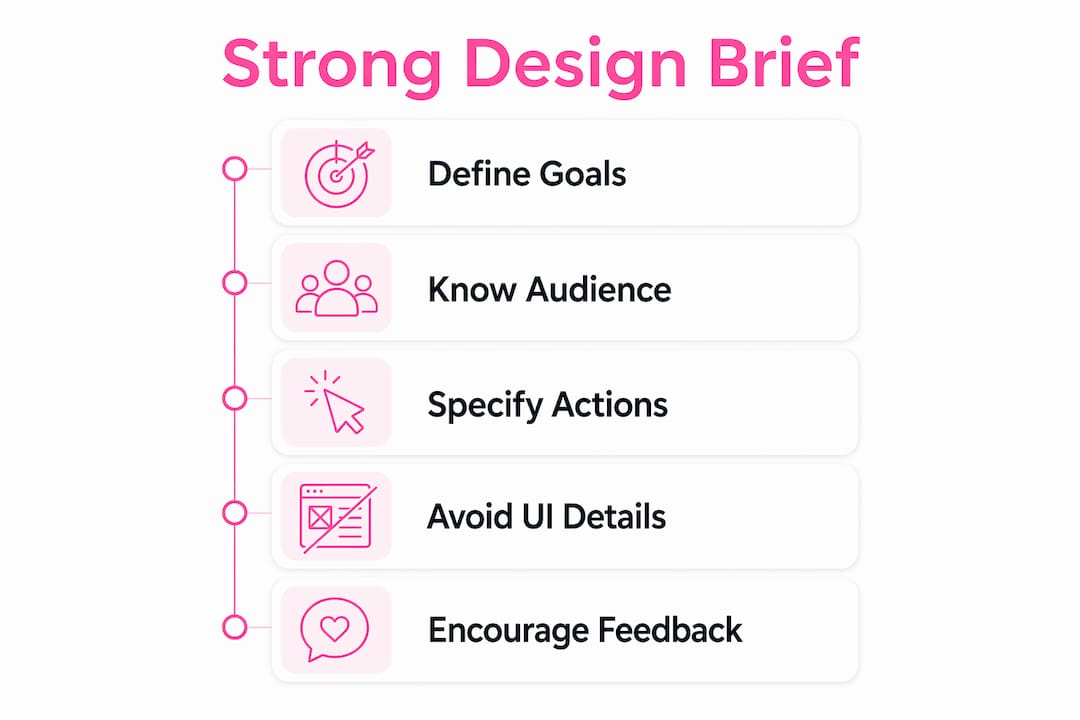
Start with your website's primary purpose. Is it to generate leads, sell products, book appointments, or build credibility? Pick one main outcome and state it directly. Designers make better decisions when they know which goal ranks first.
Sharing personas, user research, or anecdotes helps designers understand audience needs and behaviors deeply. You do not need a formal research report. A short paragraph describing a real customer, what they worry about, and how they found you gives a designer more to work with than a demographic spreadsheet.
Use these tips when writing your audience and goal statement:
- Name your primary customer in one sentence. Include age, situation, and main concern.
- State the one action you most want visitors to take on the site.
- Describe what your customer already knows about your product or service before they arrive.
- List two or three websites your audience already trusts and uses regularly.
- Note any accessibility or language needs your audience has.
Visual storytelling in web design depends on content priority, not decoration. Visual hierarchy guides visitor attention and communicates priority long before visitors read any text. Tell your designer which message must land first, second, and third. That instruction shapes the entire layout.
Pro Tip: Include a "what not to do" section in your brief. Providing negative examples helps designers avoid repeating current or competitor design mistakes and clarifies your preferences faster than positive examples alone.
What does good collaboration look like during a web project?
A design brief starts the conversation. It does not end it. The best web projects treat briefing as an ongoing process, not a one-time document handoff.
Collaborative briefs and scheduled calls help clarify goals and prevent expensive revision loops. Schedule a short call after your designer reads the brief. Use that call to answer their questions, not to add new requirements.
Follow these steps to keep the project on track from kickoff to launch:
- Send the brief before the first call. Give your designer 24–48 hours to read it and form questions. This sharpens the conversation and cuts obvious back-and-forth.
- Set acceptance criteria upfront. Define what "done" looks like before any design work starts. For example: "The homepage must load in under one second and include a visible call-to-action above the fold."
- Respond to feedback requests within 24 hours. Slow feedback is the leading cause of project delays on the client side.
- Review work against the brief, not your mood. Ask "Does this solve the stated problem?" not "Do I like this personally?"
- Consolidate feedback into one document. Sending feedback in three separate emails creates confusion and missed items.
Effective asynchronous communication, like a detailed written brief and recorded explanations before meetings, sharpens designer questions and reduces obvious back-and-forth. This matters especially for remote projects where time zones and schedules do not align. Tools like Loom for video walkthroughs and Notion for shared briefs work well for keeping everyone on the same page without requiring live meetings. You can also learn more about speeding up approvals by structuring your review process from the start.
Common mistakes small business owners make when briefing designers
Poor briefing wastes 33% of project budgets on misdirected work. That figure represents real money spent on revisions, redesigns, and miscommunication. Most of these mistakes are avoidable.
"Clients who brief specific fonts, colors, and layouts too early limit designer creativity and reduce the chance of a successful outcome. Focus on the 'what' and 'why,' not the 'how.'" — Design experts at brettridenour.com
The five most common briefing mistakes, and how to fix each one:
- Dictating the design solution. You hire a designer to solve a problem, not execute a sketch. Describe the outcome you need and let them choose the method.
- Skipping content priorities. When everything is equally important, nothing stands out. Rank your messages before the designer touches the layout.
- Omitting brand voice. "Professional" means something different to a law firm than to a food truck. Give three adjectives that describe your brand and three that do not.
- Ignoring the user. Briefs that focus only on the business and ignore the customer produce sites that look good internally but convert poorly.
- Changing goals mid-project. New requirements after design work starts multiply costs and delay launches. Lock your goals before work begins and treat changes as formal scope additions.
For small business owners, the investment in website best practices pays off most when the brief is solid from day one. A weak brief does not just slow the project. It produces a website that does not perform.
Key takeaways
Clear web design vision communication requires a focused brief, a defined audience, and consistent collaboration throughout the project.
| Point | Details |
|---|---|
| Write a focused brief | Keep your design brief to 150–400 words and describe goals, not design solutions. |
| Define your audience concretely | Use a one-sentence customer description with age, situation, and main concern. |
| Set acceptance criteria early | Define what "done" looks like before any design work begins to avoid revision loops. |
| Avoid dictating UI details | Describing the problem gives designers room to find better solutions than you could specify. |
| Treat briefing as a process | Schedule a follow-up call after the brief is sent and respond to feedback within 24 hours. |
What I have learned about briefing designers as a small business owner
Most small business owners walk into a web project with a clear picture in their head and a vague document in their hands. The gap between those two things is where money disappears.
The single most valuable shift I have seen is when a client stops describing what the site should look like and starts describing what the site needs to accomplish. Every $1 invested in effective UX design returns $100 on average, but only when the problem is clearly defined first. That return collapses when the designer is executing a client's layout preferences instead of solving a real business problem.
The balance between control and openness is real. You know your customers better than any designer ever will. Your designer knows visual hierarchy, user behavior, and conversion patterns better than you do. A good brief is where those two knowledge sets meet. You bring the "what" and "why." They bring the "how."
The clients who get the best results are not the ones with the biggest budgets. They are the ones who write a clear brief, respond to questions quickly, and trust the process. Design is problem solving. Treat it that way and your website will reflect it.
— Ville
Get a website that matches your vision from day one
Verkkosivu builds custom websites for small businesses without templates, without hidden costs, and without the revision loops that drain budgets. Every project starts with a structured consultation that turns your business goals into a clear design direction. Verkkosivu has completed more than 100 projects with a perfect 5-star rating on Google, and most sites go live within 48 hours. If you want a site that loads in under one second, ranks well in search, and actually converts visitors, see what Verkkosivu delivers for small businesses like yours.
FAQ
What should a design brief include?
A design brief should describe your business goal, your target customer, the one action you want visitors to take, and examples of sites you like and dislike. Keep it to 150–400 words for best results.
Why do web projects go over budget?
Poor briefing wastes 33% of project budgets on misdirected work. Most overruns trace back to unclear goals, changing requirements, or briefs that describe design details instead of business outcomes.
Should I tell my designer which colors and fonts to use?
No. Briefing specific fonts and colors too early limits designer creativity and reduces the chance of the best outcome. Share your brand guidelines if you have them, but let the designer apply them.
How do I describe my audience to a web designer?
Write one sentence naming your primary customer with their age, situation, and main concern. Add a short anecdote about a real customer if you have one. That context helps designers make decisions that fit your actual users.
How often should I communicate with my designer during a project?
Schedule at least one call after the brief is delivered, then respond to feedback requests within 24 hours. Consistent, timely communication prevents delays and keeps the project aligned with your original goals.