
A structured website approval process is the single most reliable way to cut project delays and get digital work live faster. Most teams lose days not because the work is slow, but because the review process has no defined stages, no clear ownership, and no automated follow-up. Tools like Paminga and Velt have documented that documented workflows deliver faster completion rates, and the difference between a chaotic email chain and a structured approval workflow can mean weeks of lost time. This guide gives business owners and project managers a direct, practical framework to make their website approval workflow faster without sacrificing control.
What does a structured website approval workflow actually look like?
A website approval workflow is a defined state machine where content moves through fixed stages, each with clear entry and exit conditions. Paminga's approval framework describes five core states: Draft, Review Requested, Changes Requested, Approved, and Published. Each state triggers specific notifications and restricts which actions are available, so approvers never see content that isn't ready for them.
The benefit of this model is precision. When a piece of content enters "Review Requested," only designated approvers receive a notification. If changes are needed, the state reverts to "Changes Requested" and the author is notified automatically. No one has to chase anyone manually. This eliminates the ambiguity that causes most revision loops.

Role definitions matter just as much as the states themselves. Approval workflows typically distinguish between instance-wide approvers (who can approve any content) and workspace-specific approvers (who only handle content within a defined scope). Getting this right from the start prevents the common problem of the wrong person holding up a decision they were never meant to make.
The table below compares what each workflow state delivers in practice:
| Workflow state | Primary benefit |
|---|---|
| Draft | Author works freely without triggering notifications |
| Review Requested | Correct approvers are notified immediately and automatically |
| Changes Requested | Author receives precise feedback; content cannot advance until addressed |
| Approved | Content is cleared for publication with a timestamped record |
| Published | Audit trail is complete; version is locked |
Pro Tip: Reduce the number of transitions an approver must take to act. The fastest workflows allow approvers to approve or reject directly from their notification queue, without navigating to the content editor first.
How do parallel approvals cut review cycle times?
Sequential review is the most common cause of slow approvals. When legal must finish before brand, and brand must finish before the project manager, a three-day task becomes a nine-day chain. Parallelizing non-blocking feedback alongside critical sign-offs can reduce that nine-day chain to three days.
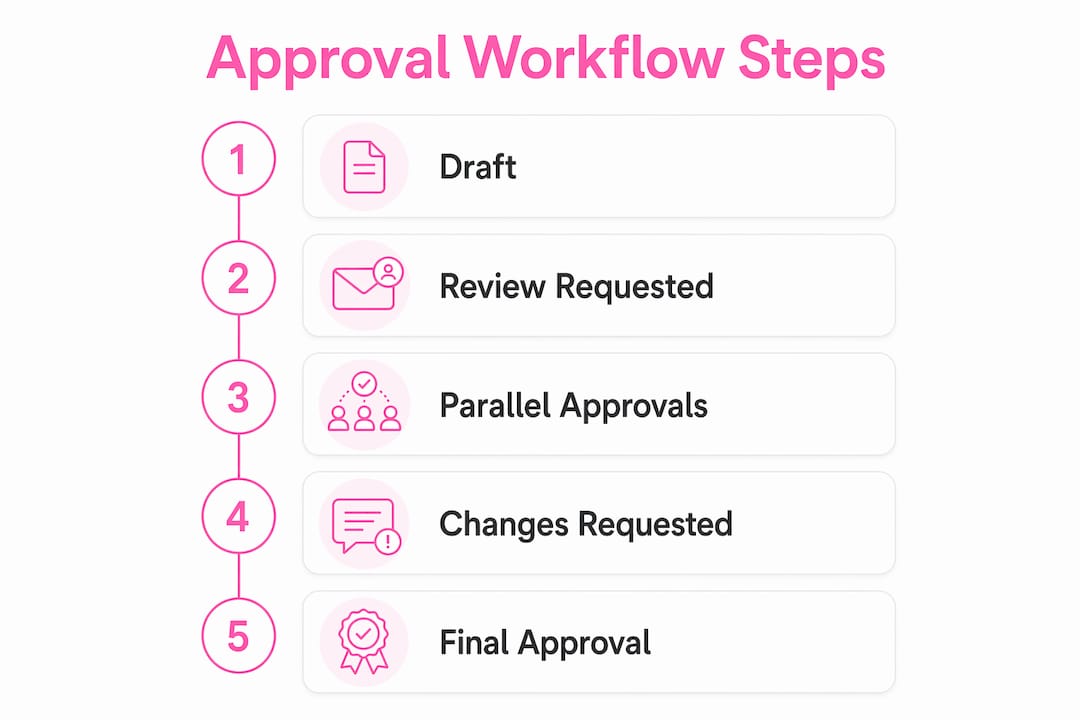
The key distinction is between blocking and non-blocking approvals. Blocking approvals, such as legal sign-off or compliance review, must be resolved before content can publish. Non-blocking input, such as brand preference feedback or copy tone suggestions, can happen simultaneously without holding up the critical path. Running these in parallel requires explicit routing so each reviewer knows their role and authority.
Here is how to structure parallel reviews without creating confusion:
- Assign explicit decision ownership. Each reviewer is responsible for a specific element or section, not the entire page. Role-based routing by scope prevents two reviewers from blocking each other on the same decision.
- Label every review as blocking or non-blocking. This tells the system and the team whether a pending review holds up publication or simply adds input.
- Avoid broadcast requests. Sending a review request to a group without assigning individual ownership creates diffusion of responsibility. Someone always assumes someone else will handle it.
- Set a single decision authority per blocking review. If legal review requires two lawyers, designate one as the final approver and the other as a contributor.
- Use preview links for non-blocking reviewers. They can comment on a staging version without accessing the CMS, keeping the review clean and the system uncluttered.
Pro Tip: Many teams mistakenly impose sequential review when independent parallel reviews would significantly accelerate cycle times. Audit your current process and mark every review step as either blocking or non-blocking before redesigning the workflow.
What technology enforces deadlines and escalation in approvals?
Automation is what separates a workflow that works in theory from one that works under real project pressure. Modern approval workflows integrate SLA windows, automated reminders, and escalation chains to backup approvers when deadlines are missed. Without these, a missed deadline simply stalls the queue until someone notices.
Here is a practical setup for technology-driven deadline enforcement:
- Set SLA windows per stage and request type. Legal review might carry a 48-hour SLA. Brand review might carry 24 hours. Defining these explicitly means the system knows when to escalate, not just when to remind.
- Configure automated reminders at 50% and 90% of the SLA window. A reminder at the halfway point gives the approver time to act. A reminder at 90% signals urgency without being aggressive.
- Build an escalation chain to a backup approver and then a manager. If the primary approver misses the deadline, the task routes to a backup automatically. Automated escalation protocols are fundamental to maintaining throughput after missed deadlines.
- Capture a full audit trail. Every approval, rejection, comment, and version change should be logged with a timestamp and user identity. Audit trails support compliance, resolve disputes, and create accountability without requiring manual documentation.
- Integrate with your CMS and project management tools. Connecting your approval workflow to platforms like WordPress, Contentful, or Jira means status updates flow automatically rather than requiring manual updates in two systems.
The table below shows the impact of automation on common workflow bottlenecks:
| Bottleneck | Manual process result | Automated process result |
|---|---|---|
| Missed deadline | Queue stalls indefinitely | Escalates to backup approver automatically |
| Unclear approval status | Requires manual pings | Live dashboard shows real-time state |
| Compliance documentation | Assembled manually post-project | Audit trail generated continuously |
| Reviewer unavailability | Project halts | Backup approver receives task within SLA |
How do content libraries and batch approvals reduce repetitive reviews?
Pre-approved content libraries are one of the most underused tools for speeding up regulated workflows. The principle is straightforward: legal teams review a framework once rather than approving each deployment variant individually. Marketing then draws from a library of approved headlines, images, CTAs, and disclaimers to build page variants without triggering a new legal review each time.
This approach is especially powerful in financial services and healthcare, where compliance review is mandatory but the underlying approved language rarely changes. A financial services firm might pre-approve 20 headline variants, 10 CTA formulations, and a set of compliant disclaimer blocks. Any page built from those components is automatically compliant, and only pages using new, unapproved elements require a fresh review.
Batch approval extends this logic to multiple variants. Instead of submitting five landing page versions for individual review, a project manager submits all five simultaneously. Approvers review the batch in one session, cutting the number of approval cycles from five to one.
- Build the library by content type. Separate approved headlines, images, CTAs, and legal disclaimers into distinct categories so authors can find and use them quickly.
- Use role-based access to control library contributions. Only designated content owners should be able to add new elements to the library. Everyone else draws from it.
- Provide preview links for stakeholder review. Approvers should be able to see exactly how a component renders in context before approving it for the library.
- Review the library quarterly. Approved content expires. A disclaimer that was compliant in Q1 may not be compliant in Q3 after a regulatory update.
What are the most common pitfalls in website approval workflows?
The most damaging problems in approval workflows are structural, not technical. Fixing them does not require new software. It requires clear rules and consistent enforcement.
- Ambiguous feedback causes revision loops. When a reviewer writes "make it pop" or "this doesn't feel right," the author has no actionable direction. Element-bound commenting ties feedback directly to specific content components, preventing the confusion that scattered email comments create.
- Single-editor dependencies create hard bottlenecks. If only one person can make changes to the website, every revision request waits for that person's availability. Cross-train at least one backup editor per project.
- Manual email-thread approvals add weeks. Email-based approval processes add 8 to 14 extra days to workflows. Automating routing, reminders, and status tracking can reduce cycle times to under 48 hours. That is not a marginal improvement. It is a structural change in how fast your team can ship.
- Undefined approval criteria generate endless debate. Before any review begins, the team needs written standards: what constitutes a compliant headline, what image specifications are required, what tone guidelines apply. Without these, every review becomes a negotiation.
- Manual status pings replace live dashboards. Sending a Slack message to ask "where are we on this?" is a symptom of a workflow with no visibility layer. A live queue dashboard showing every item's current state, owner, and SLA status eliminates this entirely.
"The fastest approval workflows reduce ambiguity by allowing approvers to act directly from relevant queued states, eliminating unnecessary actions and delays." — Paminga
Key takeaways
A website approval workflow delivers consistent speed only when it combines defined states, parallel reviews, automated escalation, and pre-approved content assets.
| Point | Details |
|---|---|
| Use a state machine model | Define Draft, Review Requested, Changes Requested, Approved, and Published as fixed stages with automatic notifications. |
| Parallelize blocking and non-blocking reviews | Separate legal sign-offs from brand feedback and run them simultaneously to cut cycle times significantly. |
| Automate SLA enforcement | Set deadline windows per stage and configure escalation to backup approvers when deadlines are missed. |
| Build a pre-approved content library | Let legal review a framework once so marketing can deploy compliant variants without repeated sign-offs. |
| Replace email threads with live dashboards | Automated routing and real-time status visibility eliminate manual follow-ups and reduce delays by days. |
Why structured approval workflows changed how I think about project delivery
From working with dozens of business owners and project managers, the pattern is consistent: teams that struggle with slow approvals almost always have the same root problem. They have a process in their heads but not on paper. Everyone knows roughly how approvals work, but no one has written down who approves what, in what order, and what happens when someone is unavailable.
The moment a team documents those rules and puts them into a system, the change is immediate. Not because the work gets easier, but because the decisions get faster. Reviewers stop second-guessing their authority. Authors stop guessing what feedback means. Project managers stop chasing status updates.
What I find most underappreciated is the value of centralized, contextual feedback. When comments are tied directly to the element being reviewed rather than sitting in an email thread, revision cycles drop sharply. The author knows exactly what to fix. The reviewer knows exactly what they approved. There is no ambiguity to resolve.
My recommendation for business owners starting this process: do not try to build the perfect system on day one. Map your current approval stages, assign clear owners to each, and add one automation, such as a deadline reminder. That single change will show you where the next bottleneck is. Build from there, not from a blank-slate redesign.
— Ville
How Verkkosivu builds websites that fit your workflow
If your approval process is slowing down your website projects, the underlying issue is often the development setup itself. Verkkosivu builds custom websites for business owners and project managers who need professional results without the back-and-forth that drags projects out for months.

Every Verkkosivu project includes structured delivery milestones, clear review checkpoints, and direct communication throughout. With more than 100 completed projects and a 5-star Google rating, Verkkosivu delivers sites that load in under one second, are built without templates, and are ready for deployment often within 48 hours. If you want a website built around your workflow rather than against it, see what's possible with a team that treats your timeline as seriously as you do.
FAQ
What is a website approval workflow?
A website approval workflow is a structured process that moves content through defined stages, such as Draft, Review Requested, and Approved, with automatic notifications and role-based permissions at each step. It replaces ad hoc email approvals with a traceable, repeatable system.
How do parallel approvals speed up website review?
Parallel approvals separate blocking reviews, like legal or compliance, from non-blocking feedback, like brand preferences, and run them at the same time. This approach can reduce a nine-day sequential chain to three days.
What causes the most delays in website approval processes?
Manual email-thread approvals are the leading cause, adding 8 to 14 extra days to workflows. Ambiguous feedback, single-editor dependencies, and undefined approval criteria are the next most common sources of delay.
How does a pre-approved content library reduce approval cycles?
A pre-approved content library lets legal teams review a framework of approved headlines, images, and CTAs once. Marketing then builds page variants from those approved components without triggering a new review each time.
What should an automated escalation chain include?
An automated escalation chain should include a reminder at 50% of the SLA window, a second reminder at 90%, and automatic routing to a backup approver if the deadline is missed, followed by a manager notification if the backup also does not act in time.